
















Sale!-67%
Enscape Subscription
Enscape Subscription — professional software or digital subscription from Maka A Store. Activation, license type and delivery details are shown on this page.
Duration12 months
License typeSee product details
ActivationActivation details are confirmed before fulfillment
WarrantyWarranty throughout subscription
⚡ Fast activation🛡️ Warranty💬 Support🔒 Secure payment
CHAOS Enscape EDU - Educational Account for 1 Device
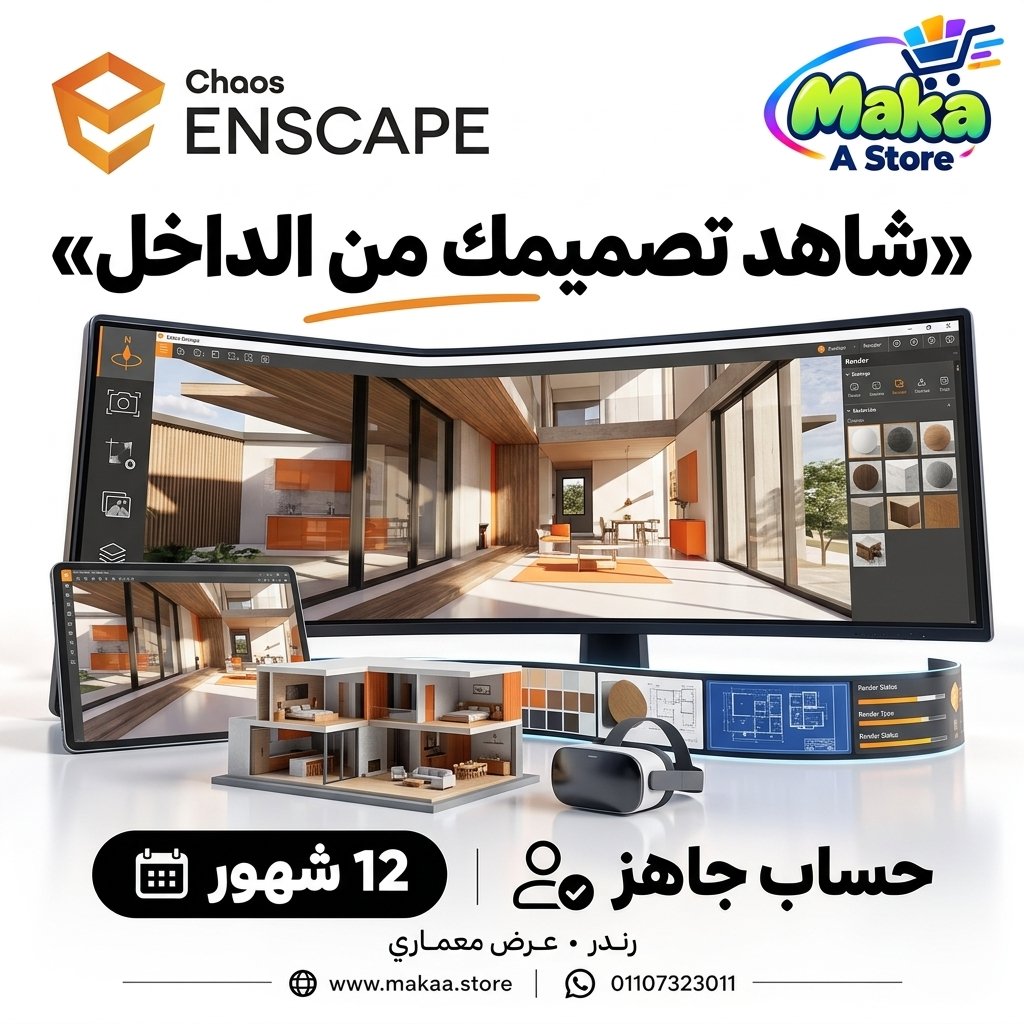
Get CHAOS Enscape EDU with a ready-to-use account for one device and access real-time rendering, walkthrough, and supported VR capabilities for architectural visualization and design training.
This is an Educational / EDU plan intended for education, learning, training, and academic use. It is not intended for commercial or profit-generating work.
CHAOS Enscape EDU - Ready-to-Use Account
Price: EGP 5,000
Subscription Details
- Product: CHAOS Enscape EDU.
- Plan Type: Educational / EDU.
- User ID and Password are provided.
- The account is intended for one device only.
- Real-Time Rendering.
- Interactive Walkthrough capabilities.
- VR support according to available tools and supported hardware.
- Suitable for education and training in architectural visualization.
- Support during login and setup.
Important Account Notice
The account is intended for use on one device only.
Signing in from multiple devices or attempting to use the account across different systems may cause access issues or account restrictions according to the service policies.
Repeated dashboard logins from multiple devices should also be avoided to help maintain stable account access.
Important Notice - Educational Plan
This is an EDU plan intended for education, training, learning, and academic use only.
The Educational plan should not be used as a replacement for a Commercial license for paid projects, profit-generating work, or professional commercial use.
Usage Restrictions
- Educational Use: Intended for learning, training, studying, and eligible academic activities.
- Commercial Use: Not intended for commercial or paid professional projects.
- Devices: One device only.
- Account: Account sharing across users or multiple devices should be avoided.
- Users must comply with CHAOS Educational licensing terms and policies.
What Is Enscape?
Enscape is a real-time rendering solution that allows architects and designers to visualize design changes quickly while working on their projects.
Instead of waiting for lengthy traditional render processes, users can preview designs, move through projects, and create interactive visualizations more quickly.
Real-Time Rendering
Enscape provides real-time rendering capabilities that allow design changes to be viewed quickly within the visualization environment.
This can help with:
- Reviewing designs while working.
- Testing lighting and materials.
- Previewing results quickly.
- Reducing the time between design changes and visualization.
Walkthrough
Enscape allows users to move through a project and experience spaces from a first-person perspective.
Walkthroughs can be useful for:
- Exploring interior spaces.
- Reviewing architectural projects.
- Understanding spatial relationships.
- Learning how to present projects interactively.
VR Support
Enscape provides virtual reality capabilities according to supported hardware and currently available features.
VR can be used to explore projects in a more immersive way and better understand scale and spatial design.
Design Software Integration
Enscape integrates with several popular architectural and 3D design applications according to supported versions, including:
- Autodesk Revit.
- SketchUp.
- Rhino.
- Archicad.
Image Rendering
Enscape can be used to create rendered images from architectural projects with lighting, materials, and visualization controls according to available tools.
Video Creation
The software provides tools that can help create animated paths and video presentations for projects.
Interactive Project Presentation
Real-time visualization makes it possible to review and present design changes quickly during education and training without producing a completely new traditional render after every small modification.
Enscape for Architecture
Architecture students and trainees can use Enscape to learn how to turn 3D models into clear and interactive architectural visualizations.
Enscape for Interior Design
Interior design students can use Enscape to learn how to visualize materials, lighting, furniture, and spatial arrangements.
Enscape for Academic Training
The EDU plan can be useful for training in areas such as:
- Architectural Visualization.
- Interior Visualization.
- Real-Time Rendering.
- Lighting.
- Materials.
- Walkthrough Creation.
- VR Presentation.
Who Is It Suitable For?
- Architecture Students.
- Interior Design Students.
- 3D Visualization Learners.
- Users learning Revit, SketchUp, Rhino, or Archicad.
- Users learning real-time rendering workflows.
EDU vs. Commercial
Enscape EDU: Intended for education, learning, training, and academic use.
Enscape Commercial: Intended for professional, commercial, business, and paid project use according to commercial licensing terms.
Important Before Purchase
If your purpose is learning, training, or studying, the Enscape EDU plan is intended for these types of use.
If you need Enscape for paid professional projects, commercial work, or business use, an appropriate Commercial license should be used.
Account Delivery
- User ID is provided.
- Password is provided.
- The account is intended for use on one device only.
- Support is provided during login and setup.
CHAOS Enscape EDU Details
Product: CHAOS Enscape EDU
Plan Type: Educational / EDU
Delivery: User ID + Password
Devices: 1 Device Only
Usage: Education, Learning, Training & Academic Use
Commercial Use: Not Intended for Commercial or Profit-Generating Use
Price: EGP 5,000
Delivery Time
Orders are usually completed within 10 minutes to 5 hours, depending on order volume and account preparation procedures.
Support
- Support during login.
- Assistance with setting up the account on the designated device.
- Follow-up until the service is working correctly according to the offer terms.
With Maka A Store, get CHAOS Enscape EDU for one device and access real-time rendering, walkthrough, and supported VR tools for architectural visualization education and training.
Ordering & activation
Add the product to cart, complete checkout, choose a payment method and upload the receipt when required. Subscription and delivery details are confirmed before fulfillment.






Customers who subscribed with us
★★★★★5.0485 reviews
★★★★★✓ Verified purchase
Ahmed Gomaa
★★★★★✓ Verified purchase
Nader Hegazy
★★★★★✓ Verified purchase
M Abo Salah
★★★★★✓ Verified purchase
Saeed Hassan
★★★★★✓ Verified purchase
Osama Noureddine
★★★★★✓ Verified purchase
Taha Elsharkawy
★★★★★✓ Verified purchase
Mostafa Reda Mahmood
★★★★★✓ Verified purchase