










 Sale! -26%
Sale!-90%
Canva 500-User Dashboard
Canva 500-User Dashboard — professional software or digital subscription from Maka A Store. Activation, license type and delivery details are shown on this page.
Offer ends in
00h:00m:00s
👁️ 153 viewing this product now
Duration12 months
License typeEducational version with all Pro features
ActivationTo your personal account/email
Warranty12-month warranty
⚡ Fast activation🛡️ Warranty💬 Support🔒 Secure payment
Canva AI Pro - 1-Year Dashboard for Up to 500 Users
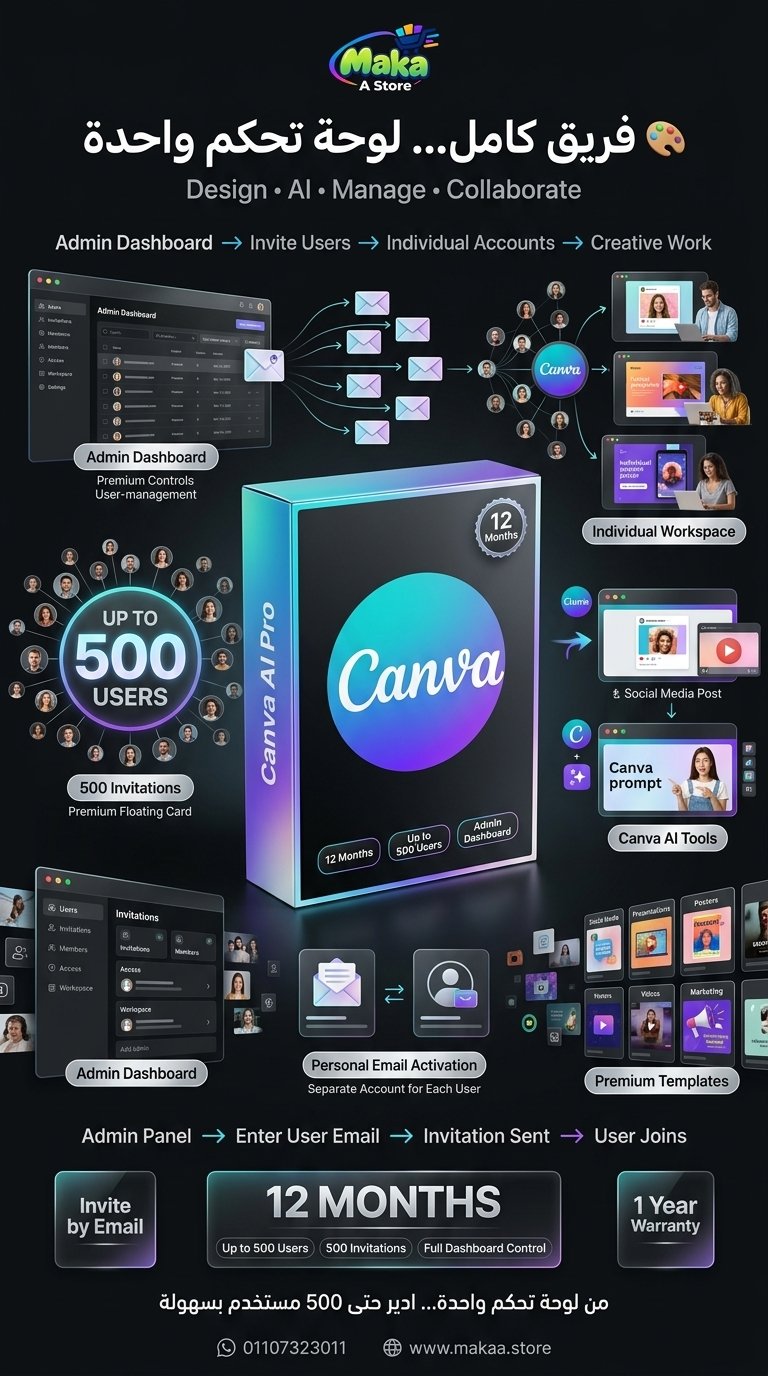
If you manage a large design team, marketing team, digital service business, training group, or multiple customers, Canva AI Pro gives you a centralized way to manage up to 500 users from one dashboard.
Instead of managing separate subscriptions individually, you can add users through their own email addresses and allow each user to work from their personal account environment.
Canva AI Pro - 500 Users
Price: EGP 2,000 / Year
Subscription Details
- Plan: Canva AI Pro.
- Duration: 1 Year.
- Users: Up to 500 Users.
- Management: Centralized Dashboard.
- Activation: User Email Invitations.
- Up to 500 invitations for 500 different email addresses.
- Each user accesses the service through their own account.
- Each user manages their own designs and projects.
- User management through the dashboard.
- 1-year warranty.
- Technical support during and after activation.
Dashboard for Up to 500 Users
The subscription includes a management dashboard that can be used to invite and manage up to 500 different users.
Each user receives an invitation on their own email address and can access the available Canva features through their personal account.
Separate Account for Each User
Each user is added using their own email address, allowing them to maintain their own projects and designs separately.
Suitable for:
- Design Teams.
- Marketing Teams.
- Large Customer Groups.
- Students and Trainees.
- Companies and Agencies.
- Digital Service Providers.
Canva AI Pro Features
Users can access the features available within the plan according to the current account configuration and Canva service availability.
Common uses include:
- Social Media Design.
- Presentation Design.
- Video Creation.
- Marketing Materials.
- Advertising Design.
- Visual Content Creation.
- AI-powered Canva tools available within the plan.
- Templates and design assets available within the subscription.
- Project and file management.
Canva AI Tools
Canva provides AI-powered tools that can help accelerate design and content-creation workflows according to the features available within the plan.
They can support:
- Design Idea Generation.
- Content Creation.
- Image and Visual Creation.
- Faster Design Editing.
- Marketing Content.
- Improved Design Workflows.
Ready-Made Templates
Users can access a large library of templates for different types of design projects.
Suitable for:
- Social Media Posts.
- Presentations.
- Posters.
- Flyers.
- Business Cards.
- Marketing Materials.
- Videos.
- Advertisements.
Photos, Videos & Design Assets
Users can access Canva's available library of photos, videos, icons, graphics, and design elements according to the plan.
Social Media Design
Canva can be used to create content for major social media platforms.
Suitable for:
- Facebook.
- Instagram.
- TikTok.
- YouTube.
- Pinterest.
- LinkedIn.
Video Design
The platform provides tools for creating short videos and visual content for marketing and social media campaigns.
Presentation Design
Users can create professional presentations for business, education, marketing, and project workflows.
Suitable for Companies & Teams
A centralized dashboard for a large number of users makes the plan suitable for organizations that need to manage multiple accounts from one environment.
Suitable for:
- Companies.
- Marketing Agencies.
- Design Teams.
- Social Media Teams.
- Educational Organizations.
- Training Groups.
- Digital Service Providers.
- Business Owners.
Suitable for Customer Management
If you provide digital services to multiple customers, the dashboard can be used to manage invitations and add users through their email addresses according to available account capabilities.
Activation Method
After completing your order, the subscription dashboard is prepared for use.
Users can then be added using their email addresses and receive invitations directly.
Activation steps:
- Receive access to the management dashboard.
- Add the required user email address.
- An invitation is sent to the user.
- The user accepts the invitation.
- The user can start accessing the features available within the plan.
Warranty & Support
- 1-Year Warranty.
- Support during activation.
- Technical assistance when needed.
- Help with managing users and invitations.
- Support for subscription-related issues according to service terms.
Delivery Time
The subscription is usually prepared and delivered within 10 minutes to 5 hours, depending on order volume.
Canva AI Pro Details
Product: Canva AI Pro
Duration: 1 Year
Users: Up to 500 Users
Invitations: Up to 500 Invitations
Activation Method: User Email Invitation
Management: Centralized Dashboard
Warranty: 1 Year
Price: EGP 2,000
Keywords
Canva AI Pro, Canva Pro, Canva 500 Users, Canva Team, Canva Dashboard, Canva Subscription, Canva Pro Price, Buy Canva Pro, Canva AI, Canva Team 500 Users, Canva Business, Canva for Teams, Canva Annual Subscription, Canva Egypt, Canva 1 Year, Canva Management Dashboard, Canva Invitations, Canva AI Tools, Canva Design Software, Canva for Marketing, Canva for Designers, Canva Pro Egypt.
With Maka A Store, get Canva AI Pro for one year with a centralized dashboard for up to 500 users for EGP 2,000, including email-based user activation and a full one-year warranty.
Ordering & activation
Add the product to cart, complete checkout, choose a payment method and upload the receipt when required. Subscription and delivery details are confirmed before fulfillment.




Customers who subscribed with us
★★★★★5.0472 reviews
★★★★★✓ Verified purchase
Ziad Abdelrahman
★★★★★✓ Verified purchase
Amin Hassan
★★★★★✓ Verified purchase
Ramy Hany
★★★★★✓ Verified purchase
Hossam Tarek
★★★★★✓ Verified purchase
Tamer Abdelbaset
★★★★★✓ Verified purchase
Oday Khaled
★★★★★✓ Verified purchase
Nour Khaled
★★★★★✓ Verified purchase
Salma Magdy
★★★★★✓ Verified purchase
Islam Hossam
★★★★★✓ Verified purchase
Doaa Hassan
★★★★★✓ Verified purchase
Mostafa Nabil
★★★★★✓ Verified purchase
Hany Abdelhady
★★★★★✓ Verified purchase